![[LinuxFocus-icon]](../../common/images/logolftop_319x45.gif) |
|
|
![[Photo of the Author]](../../common/images/Guido-S.gif)
by Guido Socher (homepage) About the author: My first RPN calculator was a HP15c and it was love at first sight. |
RPN calculators for Linux
Abstract:
RPN stands for Reverse Polish Notation. Reverse Polish Notation was developed in 1920 by Jan Lukasiewicz as a way to write a mathematical expression without using parentheses and brackets.
It takes a few minutes to learn RPN but you will soon see that
this entry method is superior to the algbraic format.
|
3 enter
1 +      (immediately you see the result of this operation: 4)

x^2      (immediately you see the result of this operation: 16)
1+       (immediately you see the result of this operation: 17)
4*       (final result: 68)
So to enter this formula you needed 9 key strokes and you could see all the intermediate results. It is basically how you would evaluate a formula when you evaluate it without calculator in your brain. In other words the calculator is much more "natural". It works the same way that your "brain works".
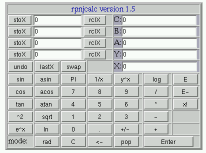 This calculator uses Javascript. It is my own design and runs in any
modern (!) webbrowser (does not work properly with opera 5/6, netscape 4, konquerer). It is different from many other javascript calculators
because you can use also the keyboard to type in numbers and basic mathematical operators. Just click here
to play with rpnjcalc
This calculator uses Javascript. It is my own design and runs in any
modern (!) webbrowser (does not work properly with opera 5/6, netscape 4, konquerer). It is different from many other javascript calculators
because you can use also the keyboard to type in numbers and basic mathematical operators. Just click here
to play with rpnjcalc| Name: | rpnjcalc |
| Homepage: | http://main.linuxfocus.org/~guido/javascript/rpnjcalcallver.html |
| License: | GPL |
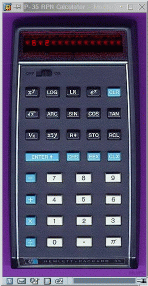 This calculator uses Javascript too but it puts more emphasis on
looking like a real (old) HP-35 pocket calculator. You can test it online
by following this link
This calculator uses Javascript too but it puts more emphasis on
looking like a real (old) HP-35 pocket calculator. You can test it online
by following this link
| Name: | hp-35 |
| Homepage: | Unknown, taken from www.hpmuseum.org. Download here:hp-35.zip |
| License: | GPL |
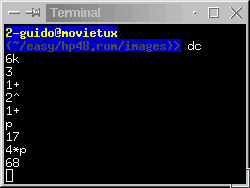 This calculator is an standard Unix command. You find it on even the oldest unix
systems. It can do only basic arithmetic but it can handle very very long numbers.
To start it just type dc and then a number followed by "k" (e.g: 6k and press return). This sets the
precision. Now you can do calculations (+-*/) and you print the lowest level
of the stack with "p". You end it with crtl-d.
This calculator is an standard Unix command. You find it on even the oldest unix
systems. It can do only basic arithmetic but it can handle very very long numbers.
To start it just type dc and then a number followed by "k" (e.g: 6k and press return). This sets the
precision. Now you can do calculations (+-*/) and you print the lowest level
of the stack with "p". You end it with crtl-d.
| Name: | dc (desk calculator) |
| Homepage: | Part of every unix system. Under Linux the package name for dc is called bc |
| License: | normally the same as your Unix system |
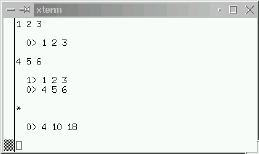 This calculator is written in Perl. It is an interessting implementation
because it is actually a vector calculator. You can of course use
it also for normal arithmetic as a single number is just a one dimmensional
vector. It has an integrated help system (just type help).
Installation is easy because it uses only standard perl modules.
This calculator is written in Perl. It is an interessting implementation
because it is actually a vector calculator. You can of course use
it also for normal arithmetic as a single number is just a one dimmensional
vector. It has an integrated help system (just type help).
Installation is easy because it uses only standard perl modules.
| Name: | vc (vector calculator) |
| Homepage: | http://vc-calc.sourceforge.net/ |
| License: | GPL |
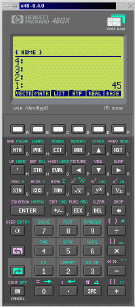
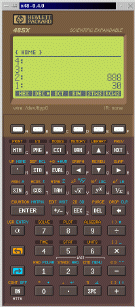 This calculator is a HP-48 emulator. That is: you can run the real code
from HP on it. The calculator just implements an emulator. You need to load
the real HP-48 ROM code. x48 has a GPL license but the the ROM is of course
copyright HP. The original hp48 calculator is no longer manufactured by HP and
HP allows now downloads of ROM images since year 2000.
Side note: It is nice to have such a calculator on the computer screen but it is
still no real replacment for a original HP-48 because the x48 has not a very
good keyboard interface. Therefore you find your self using mouse clicks
most of the time and this is rather slow.
This calculator is a HP-48 emulator. That is: you can run the real code
from HP on it. The calculator just implements an emulator. You need to load
the real HP-48 ROM code. x48 has a GPL license but the the ROM is of course
copyright HP. The original hp48 calculator is no longer manufactured by HP and
HP allows now downloads of ROM images since year 2000.
Side note: It is nice to have such a calculator on the computer screen but it is
still no real replacment for a original HP-48 because the x48 has not a very
good keyboard interface. Therefore you find your self using mouse clicks
most of the time and this is rather slow.
| Name: | x48 |
| Homepage: | ftp://www.sunsite.unc.edu/pub/linux/system/emulators/ |
| Details about the x48: | "x48 details page", installation, documentation, rom images (see also the links at the end of this article for more rom images) |
| License: | GPL, but you need a HP ROM image |
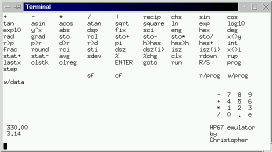 This calculator has all the functionallity of a real hp67 but it
is completley re-written and independent of the hp67 code. It
is not an emulator. The interface looks a bit basic (ncurses) but
the functionallity is very good. It comes als with excellent documentation in
the form of a man-page (see link below).
You can even program it like a real hp67.
To start programming you press "prog" then you enter your program, starting
with a lable name and you get out of programming mode with "immed".
To execute a program you use "run labelname".
Here is an example. My example is a bit useless as it implements
just the square function but it gives you an idea how to program the
hp67:
This calculator has all the functionallity of a real hp67 but it
is completley re-written and independent of the hp67 code. It
is not an emulator. The interface looks a bit basic (ncurses) but
the functionallity is very good. It comes als with excellent documentation in
the form of a man-page (see link below).
You can even program it like a real hp67.
To start programming you press "prog" then you enter your program, starting
with a lable name and you get out of programming mode with "immed".
To execute a program you use "run labelname".
Here is an example. My example is a bit useless as it implements
just the square function but it gives you an idea how to program the
hp67:
prog (enter programming mode)

label myprg
ENTER
*
rtn
immed (end of programming mode)
Now you can use "run myprg" to execute x^2.
| Name: | hp67 |
| Manual: | The hp67 man-page in html format |
| Homepage: | http://www.ibiblio.org/pub/Linux/apps/math/calc/ |
| License: | GPL |
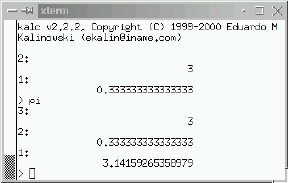 kalc runs also from the command line. It uses the readline library and
has some "command completion" features. It works with real and complex numbers, unlimited size integers, arbitrary-precision real numbers.
Very good is also the documentation (see pdf file below).
kalc runs also from the command line. It uses the readline library and
has some "command completion" features. It works with real and complex numbers, unlimited size integers, arbitrary-precision real numbers.
Very good is also the documentation (see pdf file below).
| Name: | kalc |
| Manual: | kalc.pdf 230K |
| Homepage: | http://sourceforge.net/projects/kalc/ |
| License: | GPL |
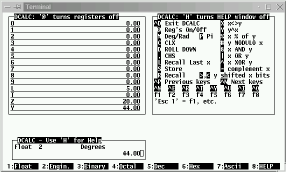 This is also a ncurses based calculator to run in a terminal window.
It is not programmable like the hp67 but it is good to convert numbers
from hex to bin to decimal.
This is also a ncurses based calculator to run in a terminal window.
It is not programmable like the hp67 but it is good to convert numbers
from hex to bin to decimal.
| Name: | dcalc |
| Homepage: | http://www.ibiblio.org/pub/Linux/apps/math/calc/ |
| License: | GPL |
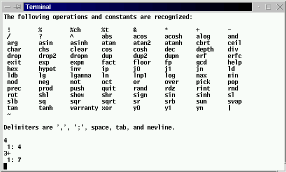 This is also a rpn calculator to run in a terminal window but it is
not ncurses based. Therefore it is very similar to the "dc" command.
It implements the functionallity of the HP28s.
rpncalc is therefore much more advanced than "dc". It can handle
complex numbers, vector and matrices.
rpncalc is part of Debian.
This is also a rpn calculator to run in a terminal window but it is
not ncurses based. Therefore it is very similar to the "dc" command.
It implements the functionallity of the HP28s.
rpncalc is therefore much more advanced than "dc". It can handle
complex numbers, vector and matrices.
rpncalc is part of Debian.
| Name: | rpncalc |
| Homepage: | http://www.gnu.org/directory/science/math/rpncalc.html |
| License: | GPL |
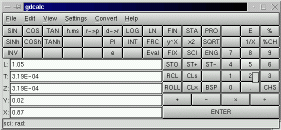 This is a nice calculator with gtk graphical user interface.
You can configure it to use either RPN or algebraic entry method.
It offers 4 modes: scientific, financial, statistics and
a number conversion mode called programming mode. This mode has
however nothing to do with programming of the calculator (like
the x48 or hp67). It offers everything that you would expect from
a desktop calculator.
This is a nice calculator with gtk graphical user interface.
You can configure it to use either RPN or algebraic entry method.
It offers 4 modes: scientific, financial, statistics and
a number conversion mode called programming mode. This mode has
however nothing to do with programming of the calculator (like
the x48 or hp67). It offers everything that you would expect from
a desktop calculator.
| Name: | gdcalc |
| Homepage: | http://bhepple.freeshell.org/dcalc/unix/ |
| License: | GPL |
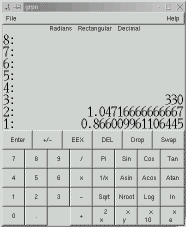 This is a an RPN calculator also based on a gtk user interface.
It offers basic algebra and trigonnometric functions.
This is a an RPN calculator also based on a gtk user interface.
It offers basic algebra and trigonnometric functions.
| Name: | grpn |
| Homepage: | http://lashwhip.com/grpn.html |
| License: | GPL |
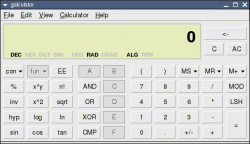 This calculator is in its functionallity very similar to gdcalc. You can configure it
to use RPN or algebraic entry method. It supports number conversion bin/hex/dec and has
all basic scientific functions.
This calculator is in its functionallity very similar to gdcalc. You can configure it
to use RPN or algebraic entry method. It supports number conversion bin/hex/dec and has
all basic scientific functions.| Name: | galculator |
| Homepage: | http://galculator.sourceforge.net/ |
| License: | GPL |
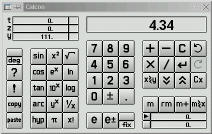 This is an old calculator. You can configure it for either RPN or
algebraic mode. It is good for basic algebra and trigonometry.
This is an old calculator. You can configure it for either RPN or
algebraic mode. It is good for basic algebra and trigonometry.
| Name: | calcoo |
| Homepage: | http://calcoo.sourceforge.net |
| License: | GPL |
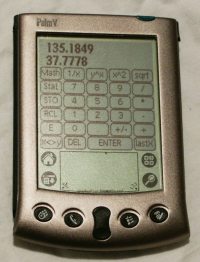 This is a basic (but free) RPN calculator for the palm pilot.
The palm does not run Linux but I present this one here because
it is available under a GPL license (a rare thing for palm software).
This is a basic (but free) RPN calculator for the palm pilot.
The palm does not run Linux but I present this one here because
it is available under a GPL license (a rare thing for palm software).
| Name: | kalk |
| Homepage: | http://www.klawitter.de/palm/kalk.html |
| License: | GPL |
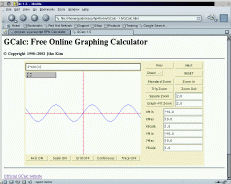 This is not an RPN calculator at all but it is still very very useful.
It is a java based online graphing calculator. To use it you need the java plugin for mozilla or netscape, part of the jre package from blackdown.org.
You can instantly draw graphs in a java capable webbrowser.
This is not an RPN calculator at all but it is still very very useful.
It is a java based online graphing calculator. To use it you need the java plugin for mozilla or netscape, part of the jre package from blackdown.org.
You can instantly draw graphs in a java capable webbrowser.
| Name: | GCalc |
| Homepage: | http://humblestar.net/GCalc/ |
| License: | GPL |
|
Webpages maintained by the LinuxFocus Editor team
© Guido Socher "some rights reserved" see linuxfocus.org/license/ http://www.LinuxFocus.org |
Translation information:
|
2005-01-14, generated by lfparser_pdf version 2.51